The latest Codecks update is now live — here’s what changed!
Upvote anywhere
Codecks gives you great project tracking, making sure that your production ship sails fast. Feedback from your community makes sure that your production is not only fast but also working towards the right direction. That’s what makes community building so instrumental for a lot of us.

We believe that combining project management and community building is the next step for modern teams:
- Your community members can now upvote cards not only on Discord, but also on your Open Decks page.
- A new stats dashboard makes it easier to see new upvotes and your most popular cards. It also allows you to quickly see how many fans are visiting your open decks and signing up to receive email updates from your open decks. The upvote statistics can be accessed from the Hand tab by selecting the potion icon on the left.
- Your own team members can now also join in on the fun and upvote cards inside your project (can be enabled/disabled for each project individually). A potential use case is to signal group agreement regarding game design ideas.
- To upvote a card look for the potion icon on top of the opened card.
Full release of the new Hand

Now Codecks is even more like playing with cards! We’ve refined the beta of the Hand v2 for more than half a year and it’s now ready for being rolled out to everyone. The completely redesigned Hand tab provides each user with a personal work queue and quick access to conversations and bookmarks.
Cards in your old Hand have been moved to bookmarks.
For more information check out the video below and our manual entry.

More improvements and fixes
- Swim lanes / Hand: Effort summary now shows completed vs total effort. This area now also contains a summary of the time tracked within a swim lane.
- Metrics: Search filters now affects all relevant metrics.
- Search: Input grows if many filters are present
- Search: Allow searching for “undone” cards.
- Conversations: Fix missing click event for Avatars without image.
- Conversations: More reliable detection of mentioned users when @mentions weren’t directly entered via the editor.
- Dependencies: Archived or done cards being unblocked no longer results in a notification.
- Account creation: resolved a conflict that could happen when user created a new org and was invited to a different org.
- Digest Mails: We’re now syncing your browser’s time zone with your user account. This means we’ll now send daily digests at ~6:15am of your time zone (instead of 6:15am CET). Time stamps in emails are now also converted into your time zone.
Card Dependencies for Pro users in Beta

Dependencies in Codecks are finally here!
- Mark any card as incoming and outgoing dependency
- Automate recurring dependency chains by applying dependencies to journeys
- Filter out locked out cards, so you can focus on cards that are ready to be worked on
- Get notified if a card you owned got unlocked
- This feature is available to Pro users only (This includes users on the education plan as well)
To enable dependencies for your org, open the Mission Control via the Joystick Icon and look for Organization Settings > Features
Automatic cover images

We’re making it easier to fill your project with beautiful card cover images. Here are two new automation options for that:
-
Any image uploaded will become a cover image. There are two modes:
- Use first image will only apply an attached image if there’s no cover image present already.
- Use most recent image will overwrite any already existing cover image, which can be a convenient way to visualize the progress of a card.
-
Sub cards will inherit the cover image of their Hero card if they don’t have their own cover image set.
Updated cover image styling for cards
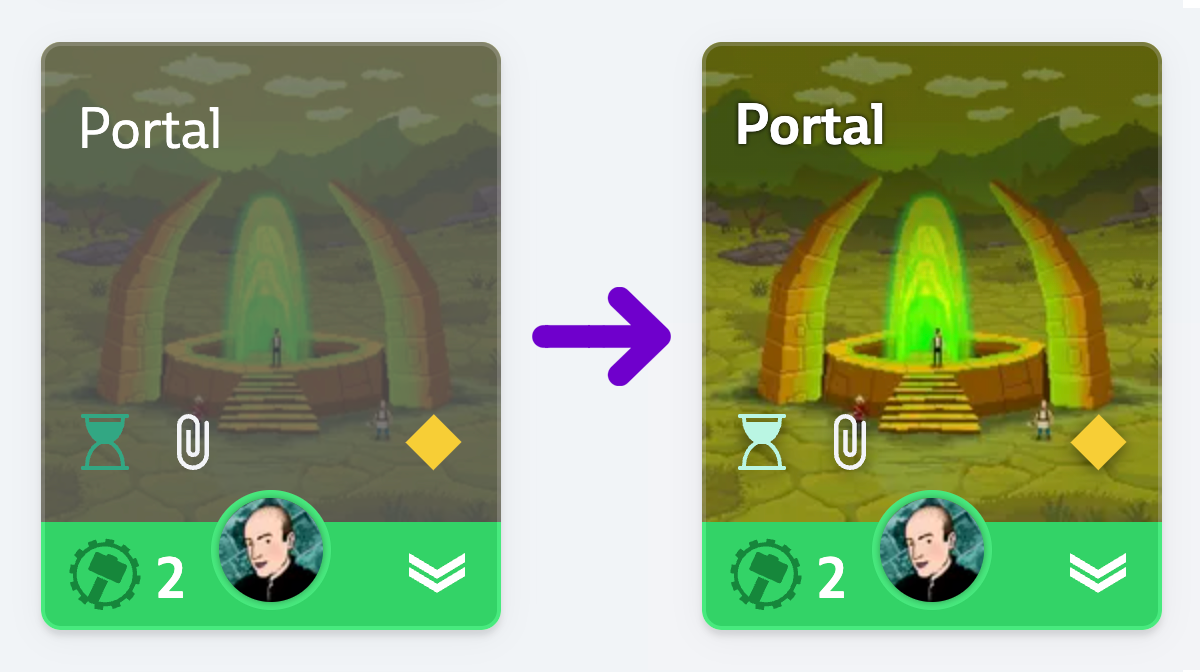
As you know trading card games are a big inspiration for us. To make sure your cover images are as striking as they can be, we reworked our card display modes. That means that from now on they will not just be more beautiful but also easier to recognize in your decks as we preserve more of the original image color. Let us know what you think!
This is only the first step towards several image-related improvements coming to Codecks soon.
Backlinks

In the bottom right of an opened card, you will now find a number that shows how many cards mention this card. Click on the counter to toggle the card list and jump to any of those cards quickly. This is super useful for maintaining your wiki and GDD inside of Codecks.
Clone Projects to other Organizations

Maybe you have multiple organization accounts with different projects but you would prefer to have one central organization account instead. Or maybe your student team started as part of your university organization but now you would like to promote your project to run in your own company account instead.
That’s easily possible now: through the organization settings you may now clone projects from one organization to another.
Cloned projects will retain all original information such as card history, activity feed, comments, attachments and once you enable your team members in the new organization, they can continue where they just left off.
Hand v2 improvements

We’re getting closer and closer to release the Hand v2 for everyone. So in case you haven’t tried it out yet, make sure to open your Org Settings and enable it in the “Features” section.
Here’s a list of things we’ve improved:
- New layout for the conversation/bookmark/team member hand section. A much more concise view to help you focus on only the important things.
- Reworked the Hand/Bookmark interactions once a card is opened. The bookmark icon has been moved from the top to the bottom right, while the hand button’s behavior is now a) consistent across all contexts and b) featured with an
ctrl/cmdclick interaction which allows to directly add or discard a hand without having to open the Hand Overlay. - Likewise the bulk selection bar now has a
ctrl/cmdclick interaction allowing to directly add or discard multiple cards at once to the hands of their owners. - New hand icon!
Automatic Project Tags and Emojis
You are now able to set an “Auto project tag” for your decks. This means all cards within this deck will receive this tag. Removing a card from this deck removes the tag. Look for the 🤖 within your deck’s header to set it up!
In addition we now allow you to decorate project tags with emojis (not just colors)! Every card containing this tag will display this emoji in front of their title.
Combining these features allows for some powerful stuff: You can decorate your #bug project tag with the 🐞 emoji and use this tag as an “Auto project tag” for your “Bugs” deck. Now every bug card will contain a 🐞 next to their title and can be easily spotted. This feature will also help to keep an overview of your cards when you have lots of different projects. Applying different emojis to decks in you various projects will make it much clearer where a card belongs to.
Improvements for Hand v2
We think the concepts for the new Hand v2 are fairly unique, so we figured it’s time to make it look unique as well 💄 In addition, we’ve reworked the process for adding a card to the hand from within a deck or milestone. Rather than directly appending a card to a hand, we’re opening an overlay showing the person’s hand, allowing to reorganize it and dragging the opened card into the right place. We’ve also changed the look of the activity feed in the hand to accommodate for the dark background as well as come up with new way to present inaccessible cards 🕵️♀️.
Say Hello to Steamy!
We’ve been working on a sweet little tool to help game developers to keep an eye on their Steam reviews. Rather than constantly hitting F5 on your Steam page to get the latest reviews, you can setup Steamy to connect to your Discord server. Enter all the games for which you’d like to track reviews and Steamy will continuously check them and post the latest reviews to a Discord channel of your choice.
Steamy is free and works for Codecks and non-Codecks users alike. You can access the Open Beta version here: www.codecks.io/steam-bot


